Time Warp Scan - Face Scanner
- 4.6
- Rating
- 1.00M
- Installs
- Free
- Price
 Analysis by App-foxy
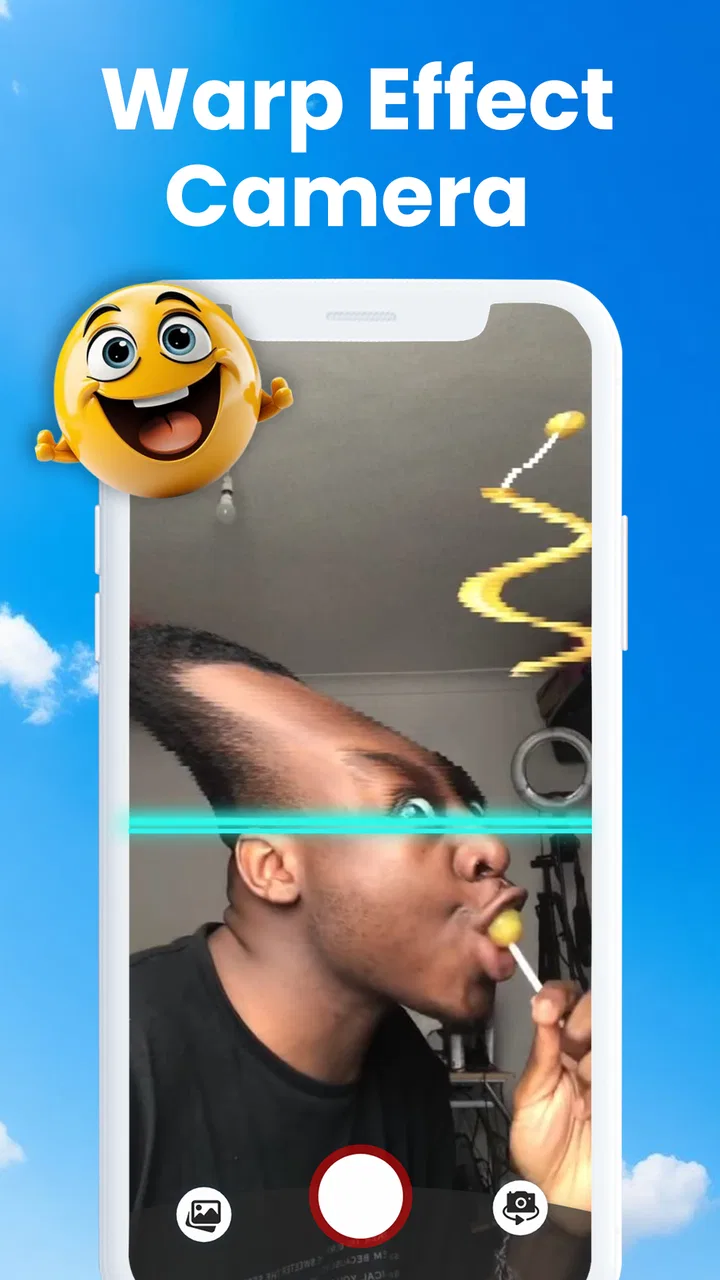
I tried Time Warp Scan - Face Scanner as a playful photography app rather than a serious camera replacement, and that distinction matters from the first launch. Its appeal is built around the familiar frozen-scan effect seen in short-form video: part of the image appears to lock in place while the scan continues across the frame, creating stretched faces, unusual poses, and deliberately awkward portraits. It is the sort of tool I would open when I want a quick laugh or a strange social post, not when I need dependable exposure, sharp editing, or careful composition.
The app comes from Technoline Apps and is free to install, with optional in-app purchases listed from $4.99 to $49.99 per item. That makes the initial decision straightforward: you can explore the basic experience without paying, then decide whether the extra value is worth spending money on. It is aimed at Everyone, runs on Android 7.0 or later, and its current version is 4.8.6. Those details make it accessible on a broad range of Android devices, although the actual smoothness of the camera preview will still depend on the phone.
How the scanning effect works in everyday use
The central idea is simple enough that I understood it immediately. Instead of capturing a normal still image all at once, the app records the scene progressively across the display. If I move my head, change my expression, or shift an object while the scan travels, the final picture can show different moments in one frame. The result is not meant to look natural; the fun comes from controlling the distortion.
You May Also Like

 Blood Strike: 2.5 Anniversary
Blood Strike’s Loadouts Turn Every Drop Into a Tactical Gamble
A close look at Blood Strike’s custom loadouts: how fast access to signature weapons reshapes its battle royale rhythm, rewards preparation, and narrows the gap between fights.

 Pandora - Music & Podcasts
Pandora’s Music Is Easy to Start, but Harder to Recover
Pandora’s strength is its low-effort path from a seed to a station. Its weak spot is how much confidence it asks you to place in connection, setup, and quiet recovery.

 8 Ball Pool
 Is Built on Rivalries, Rematches, and Routine
A close look at the rivalries, rematches, shared routines, and unanswered safety questions that turn a quick pool match into a persistent mobile community.

 Samsung Music
’s Quiet Strength Is Playing What You Already Own
Its reach comes less from spectacle than from dependable access to a personal library. That simplicity is both the app’s strongest retention engine and its ceiling.

 AccuWeather: Weather Radar
AccuWeather Review: A Quick, Clear Forecast for Everyday Decisions
For everyday plans, the best forecast is the one you can understand quickly. AccuWeather makes rain timing, radar, and local conditions easy to act on, with a few trade-offs.

 Hill Climb Racing
Why Hill Climb Racing Still Turns Crashes Into One More Run
A tiny car, a bumpy hill and one more upgrade: Hill Climb Racing keeps resurfacing because its simple chaos makes every near-miss feel personal.
More From Our News Desk



That control is where the app becomes more interesting than a one-tap novelty. A good result depends on keeping the phone steady while deciding exactly when to move. I found that small, deliberate movements worked better than waving around. For a face, turning the chin gradually or changing from a neutral expression to a grin can produce a more readable image than making a sudden full-body movement. The effect rewards timing, even though the interface is designed to feel casual.
A useful everyday scenario is a group chat challenge. I could place the phone against a mug or a small stand, ask someone to hold still for the first part of the scan, and then have them move only their eyes or mouth. That creates a warped portrait without needing editing knowledge. It is also a quick way to make a birthday message or a reaction image feel more personal than a standard selfie.
The app is especially suited to short sessions. I would not plan a long photography outing around it, because the concept is intentionally narrow. Instead, it works best when there is a clear creative prompt: make the strangest face, stretch one side of a room, or capture two expressions in one portrait. Giving yourself that small goal prevents the experience from becoming repetitive after the first few attempts.
Small shooting habits that improve the result
The most useful technique is to stabilize the phone before starting. A shaky hand can make the whole image look messy, while a stable viewpoint lets the movement become the subject. If I had no stand available, I found it easier to brace my elbows against a table or wall rather than trying to hold the phone loosely in front of my face.
Lighting also affects how convincing the result feels. A bright, evenly lit room makes facial details easier to recognize, while a dim scene can make the scan look muddy and reduce the impact of the distortion. I would choose a simple background as well. A cluttered room may create interesting bends, but it can also make it difficult to tell whether the effect came from the subject or from the surroundings.
For portraits, I would leave more space around the head than I normally would for a selfie. The unusual shape can extend beyond the area I expected, and a tight crop may cut off the most entertaining part. This is a small workflow change, but it saves repeated attempts. I also prefer making one movement at a time: change the expression first, then try a head turn, rather than combining several actions and losing control of the final shape.
Another practical tip is to treat the first attempt as a test rather than the final shot. The scan direction and timing become easier to understand after seeing one result. Once I know how quickly the capture progresses on my device, I can coordinate a movement more accurately. That makes the second or third attempt noticeably better without requiring any advanced camera skill.
Where it fits beside ordinary camera and video apps
A standard camera app is still the better choice for family photos, documents, landscapes, and anything I may want to print later. It captures a more faithful moment and usually gives me more dependable control over focus, exposure, and framing. A conventional video editor is also more appropriate when I want to tell a longer story or adjust timing after recording.
This app has a different strength: it turns the capture process itself into the joke. Rather than filming a normal clip and adding an effect afterward, I can create the distortion through movement during the shot. That immediacy makes it more approachable for someone who does not want to learn editing software. The trade-off is that I have less flexibility once the image is made, so a person who enjoys detailed post-production may find the experience restrictive.
It also sits somewhere between a camera filter and a social-video gimmick. Compared with a typical face filter, the effect feels less dependent on a decorative overlay and more dependent on physical timing. Compared with a full short-video platform, it is much more focused: there is no reason to open it expecting a complete social feed or a broad editing suite. I see it as a companion tool for making one unusual image, then sharing that result elsewhere if I want.
Cost, practical value, and the limits of the free experience
The financial proposition is easy to understand at a high level. The app is free to install, so I can test the main concept before deciding whether it belongs in my regular rotation. Optional purchases range from $4.99 to $49.99 per item, which creates a wide gap between trying the app casually and committing to its paid options. I would not spend money simply because the effect is amusing once; I would first check whether the additional material genuinely expands how often I use it.
That distinction is important for this type of app. The basic scanning idea is already the reason most people will download it, so paid value has to come from making the experience broader or more convenient rather than merely proving that the effect works. If I only want an occasional funny portrait, the free entry point may be enough. If I am creating themed content repeatedly, the purchase decision becomes more reasonable, but only after I have confirmed that the available paid content matches my workflow.
I consider the app good value for experimentation because the cost of trying it is low. It can provide a few minutes of entertainment with friends, a simple visual idea for a social post, or a playful way to break the routine of ordinary selfies. It is less compelling as a paid photography tool because the core creative technique remains intentionally limited. Someone expecting a complete camera replacement would be paying for the wrong kind of product.
The app has achieved a 4.6 average from around 14 thousand ratings and has passed one million installs. Those figures suggest that the concept has found a substantial audience, but they should not be treated as a guarantee that every phone or user will have the same experience. A novelty camera app can be popular while still being highly dependent on personal taste: people who enjoy visual tricks may return often, while others may exhaust the idea quickly.
I would also keep the purchase decision separate from the app’s entertainment value. A free trial can answer whether I like the scan itself, but it cannot automatically prove that every optional item is useful to me. Before buying, I would ask whether I expect to use the app repeatedly, whether I want more variety than the basic effect provides, and whether I prefer spending that money on a broader editor instead. The strongest value is in the low-risk first try, not in assuming that every paid option is necessary.
Trade-offs that become noticeable after repeated attempts
The biggest limitation is repetition. Once I have learned how to create a stretched smile or a split-looking face, the next results can feel similar unless I invent new situations. The app supplies the visual mechanism, but the user supplies most of the creativity. That is enjoyable for people who like experimenting, yet disappointing for anyone looking for a large collection of automatic transformations.
There is also a learning curve hidden inside the simple interface. The controls may be easy to understand, but getting a clean result still requires coordination between the phone, the subject, and the scan. A friend who moves too early can ruin the composition, while a friend who stays completely still may produce an image that looks ordinary. I see that as part of the charm, although it means the first result may not represent the app at its best.
Another trade-off is purpose. The effect is designed to look strange, so it is not suitable when accuracy matters. I would not use it for recording a product clearly, photographing a document, or preserving a natural portrait. Even for social content, the unusual look may not fit every post. The app succeeds when distortion is the point; it becomes a poor choice when distortion is a problem.
The Everyone age rating makes it approachable for a wide audience, and I can see it working well for family-friendly creative play. Still, I would use sensible judgment when sharing altered images of other people. A funny distortion can be harmless in a private group, but not everyone will want an unflattering face posted publicly. That is less a technical issue than a matter of consent and context, and it is worth considering because the app makes exaggerated expressions especially noticeable.
Device age can matter too. The minimum operating-system requirement is Android 7.0, which is not especially demanding, but supported software alone does not tell me how responsive the camera preview will feel. Older hardware may handle the effect less comfortably than a newer phone. I would test the free version on the device I actually plan to use rather than assuming that the experience will match a friend’s newer handset.
Who will get the most from it
I would recommend it to people who enjoy quick visual experiments, especially those who like making friends laugh without learning a complicated editor. It is a good fit for casual creators who need a distinctive idea for a selfie, a group challenge, or a short social post. It can also help someone who feels stuck with ordinary camera poses because the effect gives them a clear action to perform.
It is particularly useful in social settings where the process matters as much as the final image. Passing the phone around and asking each person to try a different movement can turn a simple gathering into a small creative game. The best results often come from collaboration: one person frames the shot, another performs, and everyone reacts to the outcome. That shared trial-and-error quality is more valuable than the effect viewed in isolation.
People who make frequent short-form content may also find a place for it in a larger workflow. I would use it to create an opening image, a reaction moment, or a visual transition, then combine that material with a normal editor if the final post needs text, music, or a longer sequence. In that role, it is a specialized capture tool rather than the entire production process.
I would skip it if my priority is professional photography, natural-looking portraits, advanced retouching, or precise video editing. A regular camera app, a dedicated photo editor, or a full video editor will be a better investment of time for those goals. I would also skip paid upgrades unless I had already used the free experience enough to know that I wanted more from this specific style of effect.
My final recommendation
After using it, I see Time Warp Scan - Face Scanner as a focused entertainment camera with a clear personality. It does not try to replace the tools I use for serious photography, and it should not be judged by that standard. Its success comes from making a familiar phone camera feel interactive: I can plan a movement, watch the result, adjust the timing, and try again.
The free installation makes the decision easy for curious users. I would download it, test the effect in good light, and try several controlled movements before forming an opinion. If the results make me laugh or give me ideas for sharing, the app has already delivered useful value without requiring a purchase. If the novelty fades after a few attempts, I have not committed to a costly photography workflow.
My recommendation is therefore positive but specific. Choose it for playful portraits, group experiments, and quick visual surprises. Keep a normal camera and a proper editor for everything that needs accuracy or flexibility. As for the optional purchases, I would treat them as a later decision tied to repeated use, not as part of the basic requirement. For casual creators who want one distinctive trick and are willing to control the timing, this is a fun free tool; for anyone seeking a complete photography app, it is better to skip it.
FAQs for Time Warp Scan - Face Scanner
01What is Time Warp Scan - Face Scanner and how does it work?
Time Warp Scan - Face Scanner is an innovative app that creates mesmerizing visual effects by freezing parts of your image in time. The app uses a horizontal or vertical line that moves across your screen, capturing and distorting images in creative ways. Simply position the line and let your imagination run wild.
02Is Time Warp Scan - Face Scanner free to use?
Time Warp Scan - Face Scanner offers a free version with basic features. However, for a more enhanced experience, including additional filters and customization options, users can opt for in-app purchases. Check the app store listing for detailed information on pricing and available features.
03What devices support Time Warp Scan - Face Scanner?
The app is available for both Android and iOS devices. It requires a minimum operating system of Android 5.0 or iOS 11.0 to run smoothly. Ensure your device meets these requirements for optimal performance and access to all features.
04Can I share my creations from Time Warp Scan - Face Scanner?
Yes, the app allows you to easily share your creations directly from the app to social media platforms like Instagram, TikTok, and Facebook. You can also save your images and videos to your device for later use or sharing through other means.
05Are there any privacy concerns with using Time Warp Scan - Face Scanner?
Time Warp Scan - Face Scanner requires access to your camera and photo gallery to function properly. The app developers emphasize user privacy and data security, but it’s always wise to review the app’s privacy policy to understand what data is collected and how it is used.
Pros
- Easy-to-use interface for beginners.
- Fun and engaging filter effects.
- No account needed to start using.
- Regular updates with new features.
- Compatible with both Android and iOS.
Cons
- Limited free features; in-app purchases needed.
- Occasional lag on older devices.
- Ads can be intrusive at times.
- Requires camera access for full functionality.
- Not suitable for professional editing needs.

Time Warp Scan - Face Scanner
Gallery